RECEIPT REDESIGN
Summary: Receipts are often confusing and merchant-centered, with codes to represent items bought, return policies that are hard to find, and the ones at CVS are of an unnecessary length. Hence, we decided to redesign a common receipt that will increase usability.
Team members: Clarissa Elbo, Eva Zhang, Saleha Ahmedi, Zhenyi Chen, and Areen Lu
Duration: November-December 2021, 3 weeks
Introduction
Why are receipts so confusing?(Problem statement)
Shoppers need clear and organized receipts, because they should be able to have accessible information on what they have purchased.
Issues
Unclear signifiers of return policy
Incomprehensible labels
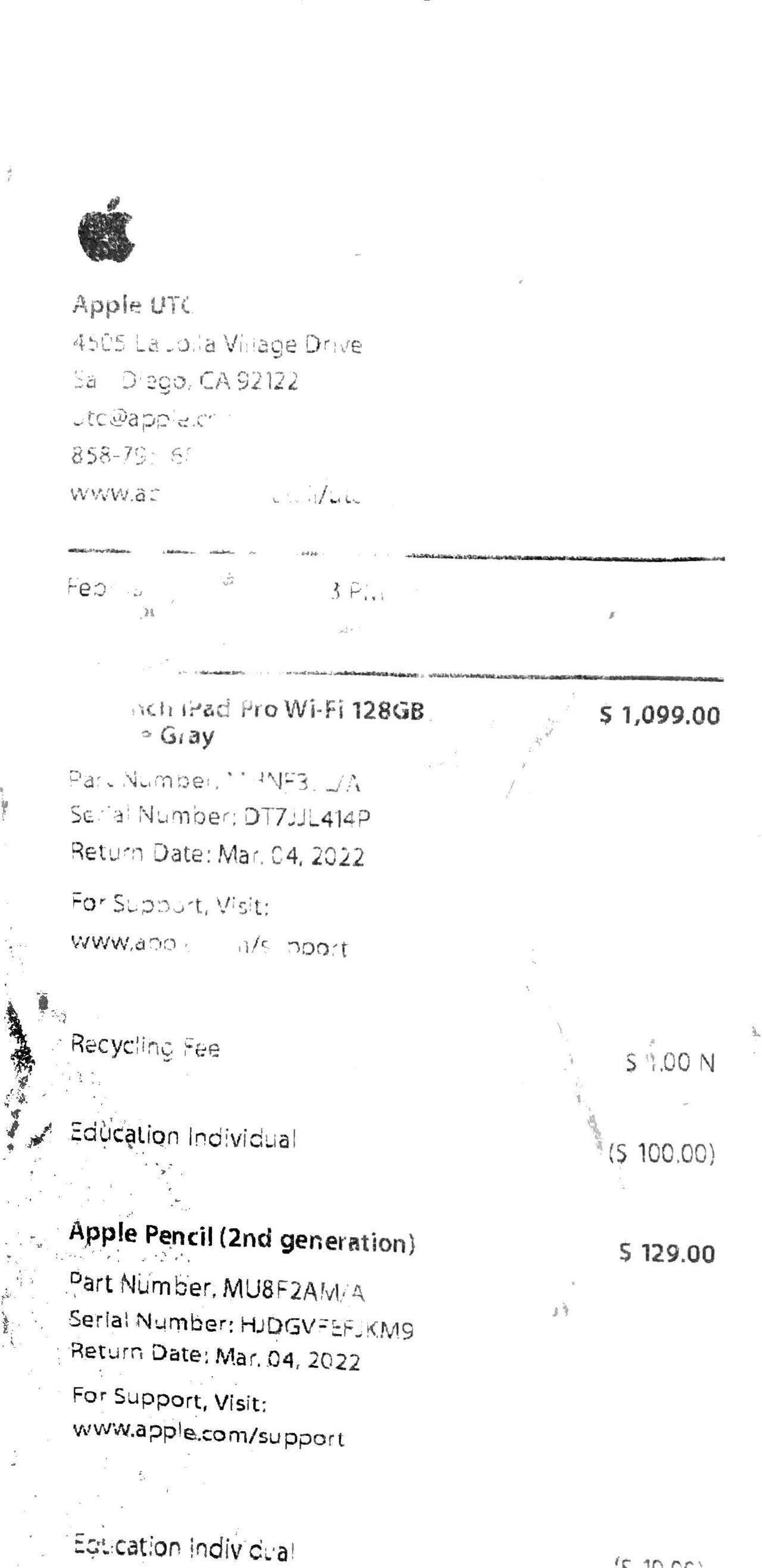
Fading ink from time & temperature
Data Gathering
-Conducted in person
-Had users identify various parts of receipt
-Timed
-Interviewed users post task regarding behavior in regarding to receipts
-Clarified missing signifiers and cause of user errorsHelped to focus changes
-Gained information about comprehensibility
Problems&Trends
Problems
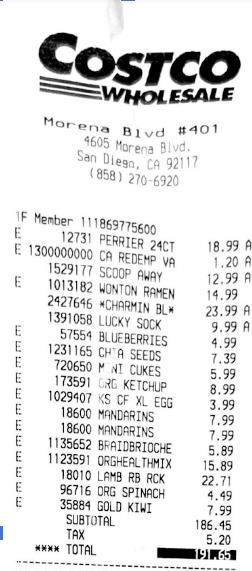
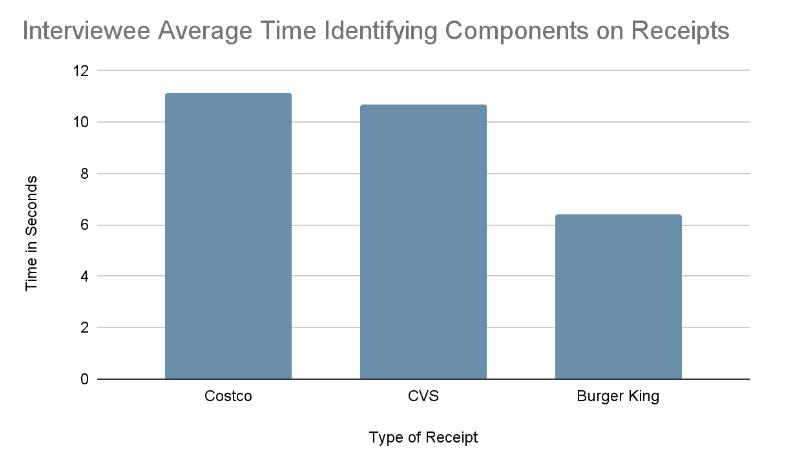
We found that the main issue with receipts was that they were merchant centered. For example, the Costco one includes codes that are undecipherable for consumers and are only used for the store for inventory purposes. This lack of natural mapping in giving normal names for purchases creates a large gulf of execution for users when trying to figure out the pricing of the items they bought. People also lack knowledge in the head regarding the various tax rates, and rely on knowledge in the world present in the receipts to inform them of such vital information. However, we found that this was a missing piece of crucial data in receipts and people could not differentiate between items that were taxed for non- restaurant places. Only three out of eighteen interviewees completed this part of the task successfully, with a mean time of eight seconds for CVS and eleven seconds for Costco. The fifteen people who were unable to identify the tax information took an average of fifteen seconds to answer. This is a large difference between the average answer time of 2.7 seconds for identifying the store information.
Trends
We concluded coupons to be useless as only three out of eighteen interviewees had used them before and five out of eighteen had never even noticed them. People are prone to memory slips in not using the available coupons or to even remember bringing them. There is a lack of natural mapping as people look at the middle of objects for the most relevant information. People do not want to look through each coupon. Based on the data regarding coupon use, we concluded that its use is to satisfy peoples’ mindset that they are taking advantage of deals so the stores get a lot of customers even though most would not remember to actually utilize the feature.
They are also highly disposable as eleven out of eighteen people discard them within a week. This lets us know that printing receipts, though legally important, is mostly a waste of paper, especially in the case of CVS with their lengthy receipts. They are easily lost and fragile, causing physical constraints for a long storage period.
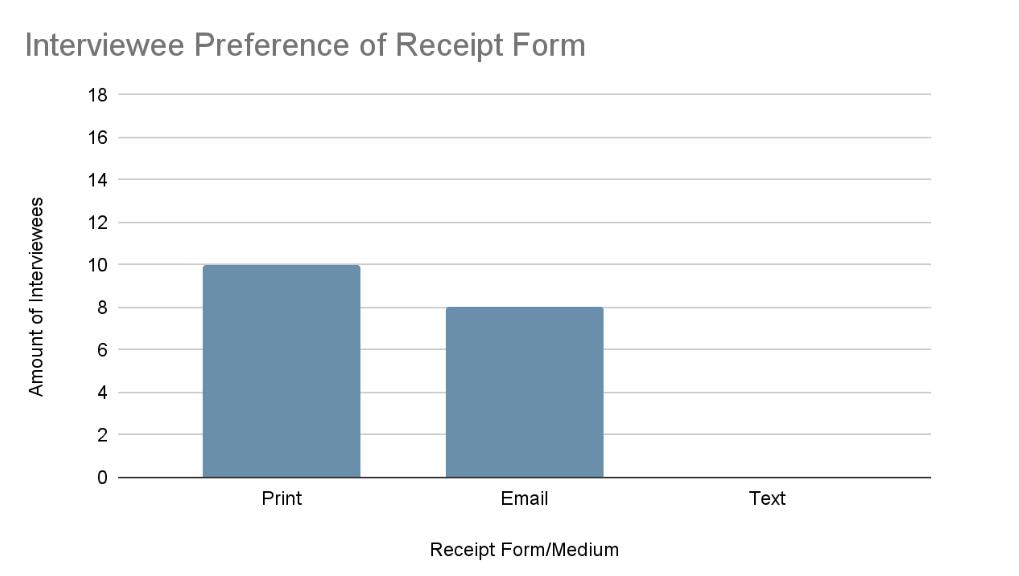
People prefer digital copies, as evidenced by ten out of eighteen participants choosing email receipts as their highest ranked form. Though some stores now provide this option, most still only give the option of printed receipts. Though emailed receipts provide storage convenience, there is a trade-off because people have to take time typing in their email addresses and they cannot get the information instantaneously. Almost half (eight of eighteen) people still opt for printed receipts because it affords immediate access and provides them with knowledge in the world of their transaction information.
Generally, people are satisfied with the overall current design of receipts. Eleven of eighteen interviewees rated them as at least eight out of ten. This lets us know that the most important information is present even though there may be a wide Gulf of Evaluation.
Design Space & Redesign
Design Charts
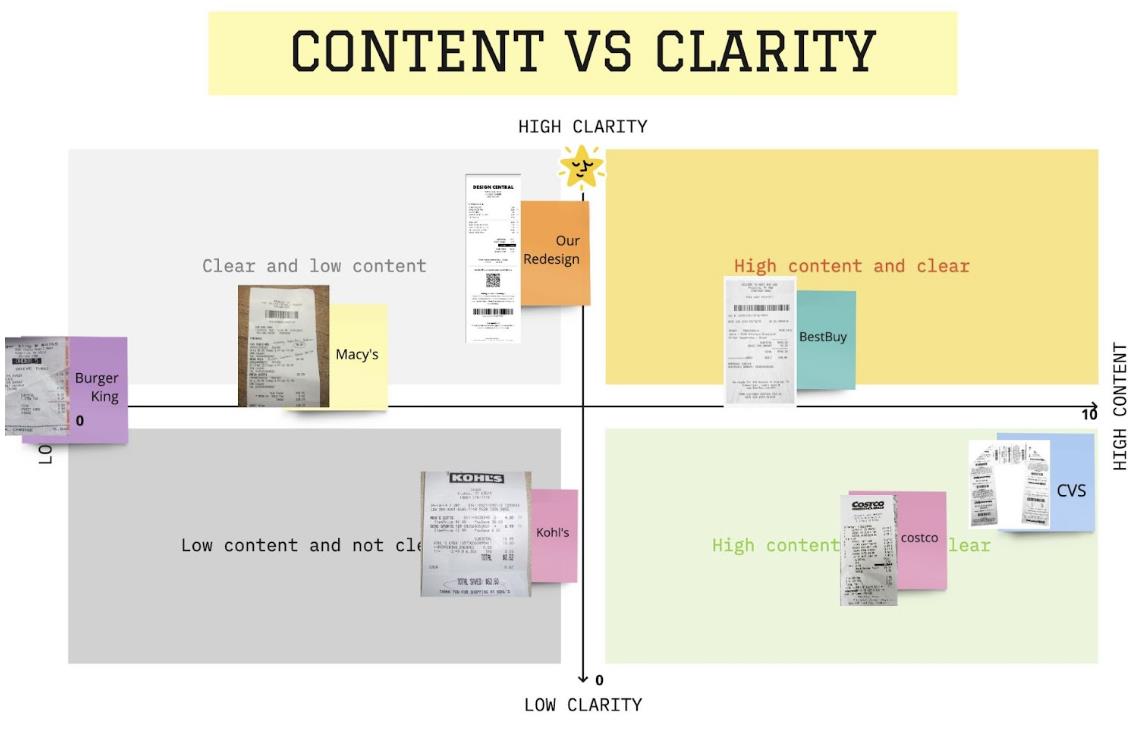
Design Space I: Content vs. Clarity
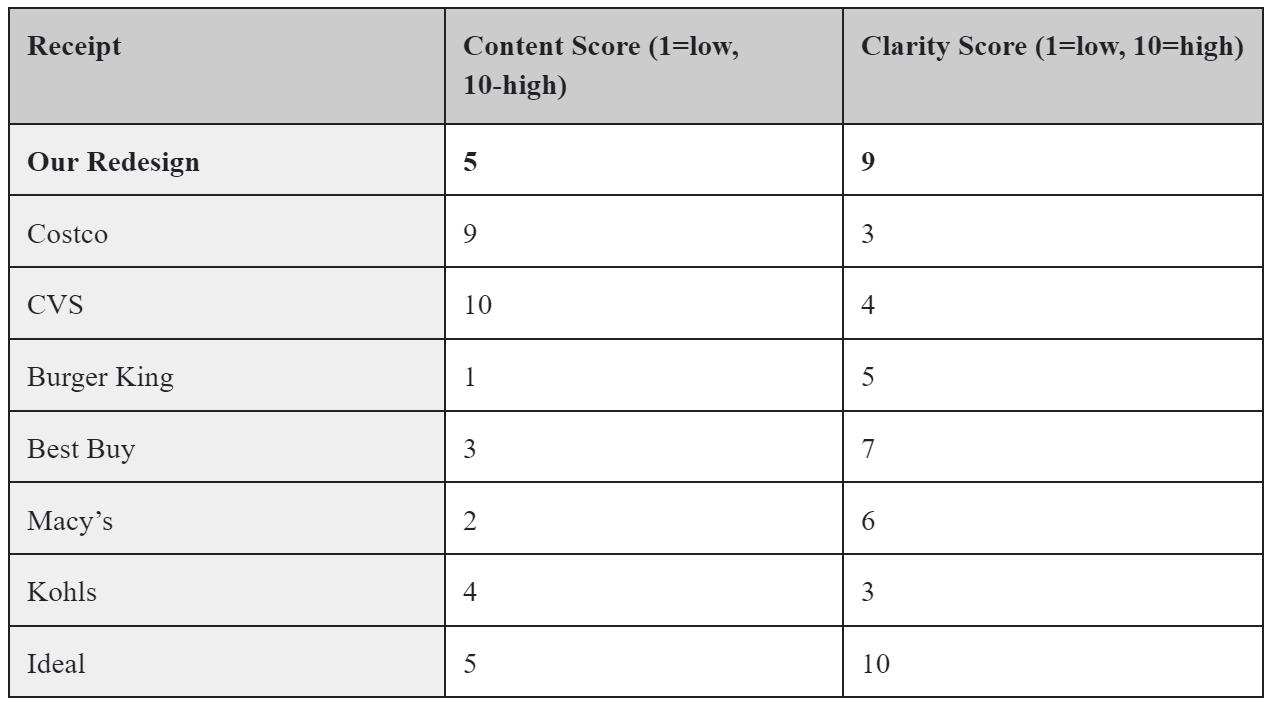
The goal for receipt is to maximize information relevance. The ideal receipt needs high emphasis on pertinent information desired by customers, reducing the search time. Limiting content can not only lower the reaction time, but also reduces errors such as knowledge-based mistakes due to the amount of incomprehensible information. Based on the research we did on different receipts, we found that the receipt that is clear tends to have about the right amount of information. They will include all needed information and limit some of the merchant info on the customer receipt, which tends to have higher clarity than the ones that have more or less information. Hence, the design advice we get is to limit the content for customer readability, ensure to include all necessary information with clear signifiers, then limit the content as much as possible for the clarity. In this case, the trade-off we have is to minimize content while keeping all necessary components to maximize clarity. Our redesign received a score of 9 for clarity since the QR code may confuse people at first glance, especially if they don’t read the instructions below it.
We found Costco receipts to be the most unintelligible, as they took interviewees an average of 11 seconds to identify the components of this receipt compared to the 10 and 6 second averages of the CVS and Burger King receipts. The design tries to combine its focus for merchants and consumers, adding unnecessary information such as item codes next to its item names. This redundant feature confuses users, reducing its clarity score. In addition, taxed items are denoted with an “A”, which can confuse users as the word “tax” begins with a “T”. This does not match with their mental model of how a taxed item should be annotated, especially since the receipt does not contain a key that explains the meaning of these annotations.
CVS entices users to continue shopping by including coupons in their receipts. However, the large barcode and lengthy information about the coupon usage increases the amount of content, directly negatively affecting its clarity.
We found Burger King receipts to be easily comprehensible, providing the necessary information for consumers. When eating out, people check their receipts to make sure the correct food was bought and Burger King does this task successfully. The item name is clear without any confusing abbreviations or codes, reflecting users’ mental model.
Macy’s receipts don’t provide much information besides purchase and store information, thus placing it on the lower end of the content axis. Its minimalistic presentation of information directly leads to its clarity. However, some may still find it lacking vital details such as returns and exchange policy, negatively affecting its clarity score.
Although Kohl’s does not present a ton of elements, the confusing codes next to the item names increases content while decreasing clarity. They do not add useful information to users’ knowledge in the head.
Best Buy receipts are clear in providing the item name and store information. They also contain additional information such as an exchange policy. However, there are also the codes for items which increases content and muddle up users’ understanding.
Design Space II: Comprehensibility vs. Reaction time
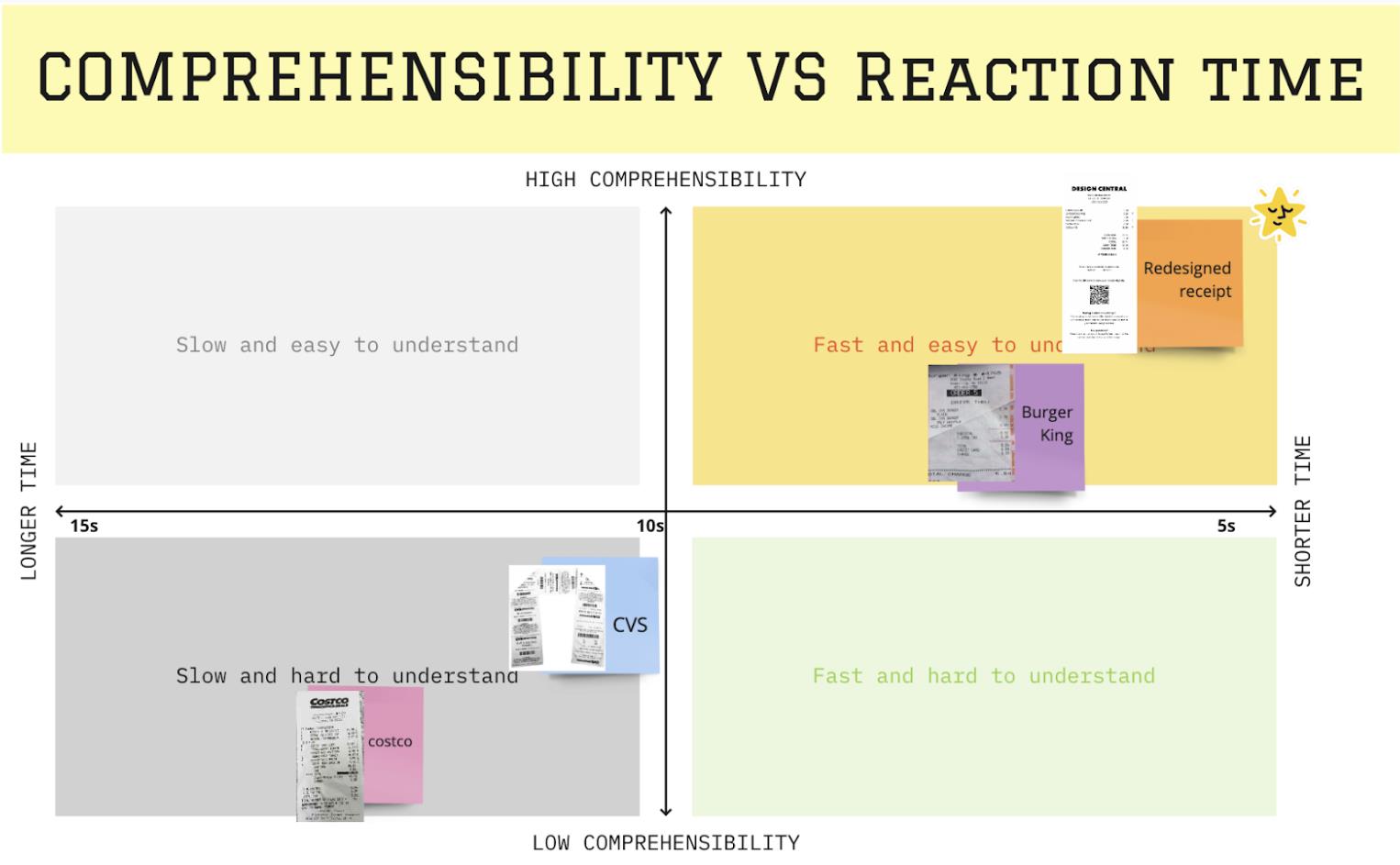
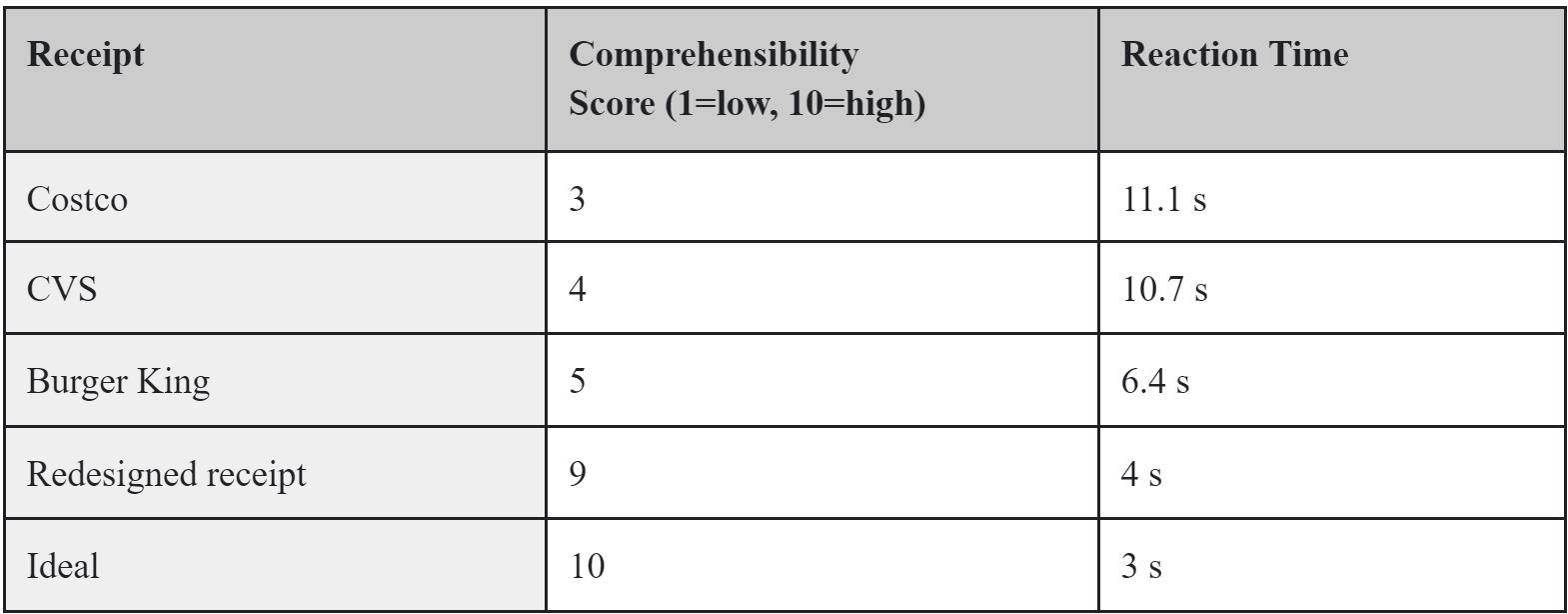
Again, the goal for receipt is to maximize information relevance. The less reaction time, defined by the amount of time participants take to identify a certain part of the receipt, the higher receipt comprehensibility is. Based on our task, our quantitative evidence proves that comprehensibility and reaction time have a clear negative correlation. Due to the consumers’ low patience toward the receipt, they simply glance for desired information rather than looking through it carefully. In order for the receipt to be more comprehensible and produce less error it needs to have less reaction time. In this case, the receipt needs to have clear signifiers for the details given.
The Costco receipt scored the lowest, as it took people the longest to find the item we asked for during the task. With an average reaction time of 11 seconds, we gave it a comprehensibility score of 3. This is attributed to the information overload and lack of white space, creating a cluttered receipt that overwhelms users. The item names are placed next to number codes meant for the merchants for storage and inventory purposes, a feature that does not help users’ mental models regarding their purchases.
Though the CVS receipt was also quite hard to understand, taking users an average of 10 seconds in completing the task, it still had a higher comprehensibility score than the Costco one.
Burger King receipts follow a more simplistic layout than its counterparts, decreasing participants’ reaction times and increasing comprehensibility. A key missing component was a return and exchange policy; though users may have knowledge in their head that food purchases are typically final, there are still circumstances that call for a refund.
Redesign
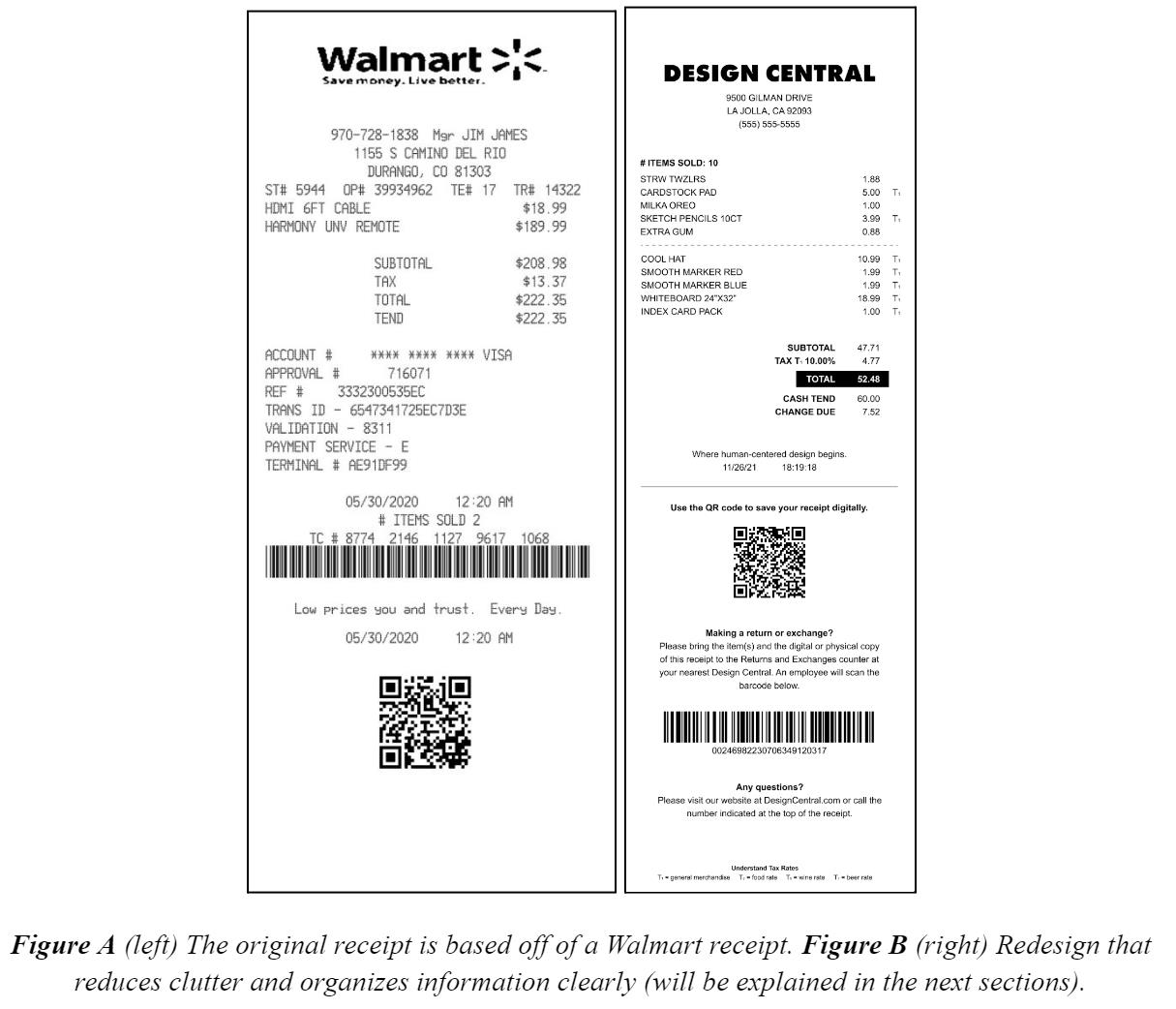
After identifying navigation difficulty, our team created a redesign to address this main issue. Out of 18 interviewees, 11 thought that the information on the receipts were either cluttered or did not make any sense to them. Participant #4 even stated that they “don’t like how receipts have so much useless stuff” and that they “just [need] the store info, product name and how much it is, and the total price and tax at the end.” Too much irrelevant information overwhelms users, discouraging them from reading their receipts. Our design solution reduces clutter and organizes information in a streamlined fashion, reducing the amount of time and effort spent on interpretation.
Redesign Tradeoffs
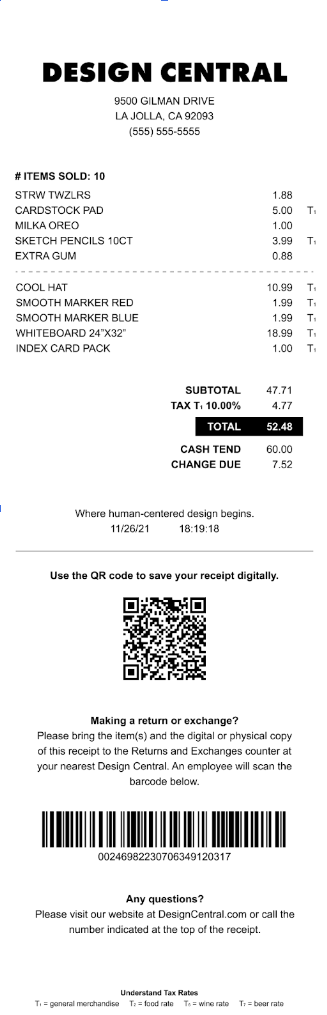
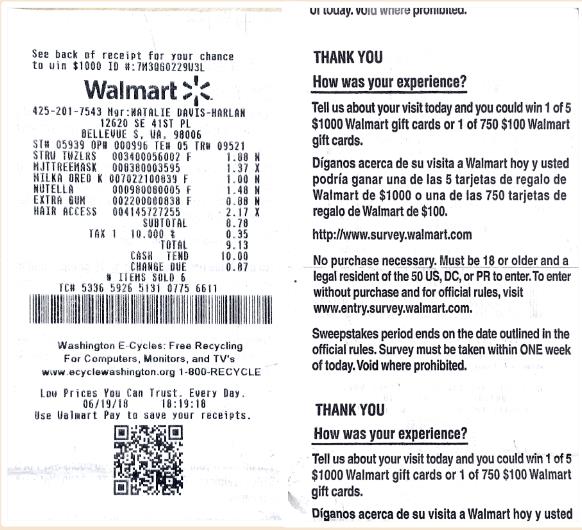
Our team decided to use a Walmart receipt as the base for our redesign, as it already comes with a QR code that links to the digital copy of the receipt. However, the receipt still contains extraneous information, such as the lines of numbers above the items purchased. Our redesign would reduce these errors, because it increases the recognisability of each part of the receipt. We removed serial numbers from the item names in order to reduce the amount of clutter and make it easier for users to read what items they had bought. This also increases the discoverability of the different components on the receipt, since they are easier to find while the user is navigating through the receipt. We also utilized bold text and horizontal lines to signify where different parts of the receipt were. For instance, we divided the payment side of the receipt that contained the items and payment information from the returns part by using a horizontal line across the width of the paper.
We also recognize that our redesign contains trade-offs. Reducing the amount of information on the receipt makes information, especially item information, more visible, as users are able to identify which components on the receipt are which in a quicker time. However, removing components, such as serial numbers, takes away information that is relevant to the merchant, making it more difficult to name the exact identity of the items. For example, two items may have the same name, but by removing the serial numbers associated with them, it could become difficult later on to identify the exact code for the item.
Redesign Prototype
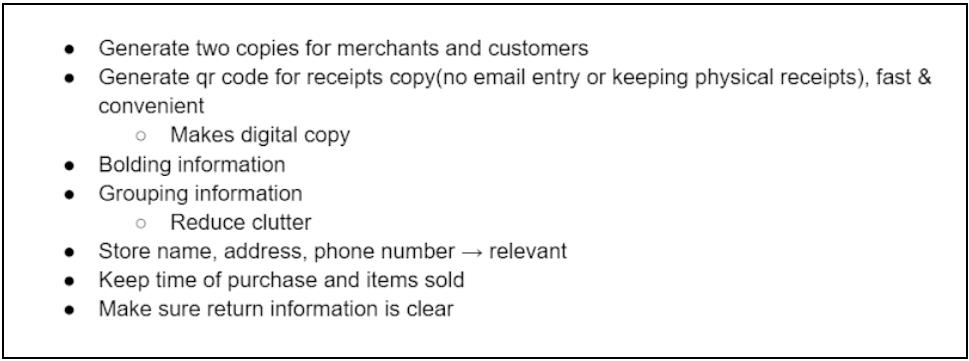
We followed the double diamond model for our redesign process. We began by using the data and trends we collected from our observations and interviews and began listing some of our initial ideas of what we wanted to include. Though the trigger was our frustration of lengthy CVS receipts, we empathized with people through interviews and defined the key issue of receipt designs being focused on merchants and converged to our problem statement, realizing that “Shoppers need clear and organized receipts, because they should be able to have accessible information on what they have purchased.” Our ideation stage is presented below.
From there, we began drafting our first redesign prototype. We used feedback from individual interviews to make additions and adjustments before creating an iteration of our first design. We took the components that we liked from the iteration and kept them for the final draft.
First Redesign
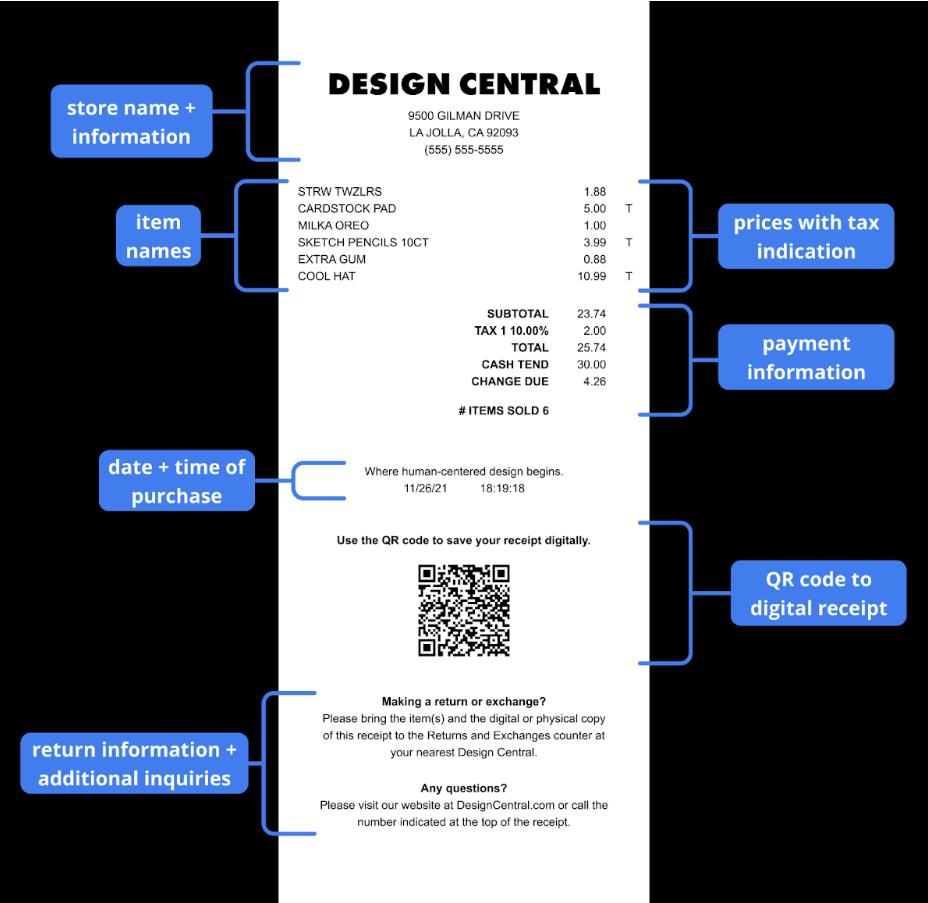
Component 1: Removing miscellaneous codes from the item names
We removed the numbers and abstract abbreviations from the item names to reduce clutter and ensured the names of the items were easily recognizable by users. During our interviews, participants showed confusion in this regard. For example, on the Costco receipt, Interviewee #5 was able to identify the items before the serial numbers, but they were unsure of what “CA REDEMP VA” meant. We wanted to make sure that what was listed could be interpreted quickly for users, even from a glance.
Component 2: Adding a QR code to the digital receipt
10 out of 18 (56%) of our interviewees preferred having digital receipts, compared to the 8 out of 18 (44%) preferring printed copies. We added a QR code to our physical redesign that would link to a digital version. This would allow users to have the physical copy of the receipt in addition to a digital one that they can save if they really wanted to keep their receipt. Our interviews also revealed that 11 out of 18 (61%) of our interviewees threw away their receipts within a week mostly due to the cluttering. A digital option would aid in reducing this clutter.
The look of the QR code paired with its label signifies that this is a component that can be scanned, as most people who use digital technology will be able to recognize that the QR code is scannable. Even if users are unfamiliar with them, the label tells users what the QR code is for. The QR code also affords scanning, because it is unobstructed on the page and leads users to a page when scanned.
Component 3: Adding information about returns and exchanges
Another component that we added was the return and exchange policy on the bottom of the receipt. Out of the three receipts, only one of them (CVS) contained this information. This was evidenced by only one interviewee being unable to find the policy when given the aforementioned receipt. Having this component adds knowledge to the world, as its location is consistent and contains what the user is looking for. In addition, the placement lines up with the users' mental model of the typical receipt layout, aiding in information finding. We also decided to make it short and concise so that users would not have to spend too much time reading through paragraphs of information. Any questions or clarifications would be directed to the store’s website and phone number, placed right under the policy.
Component 4: Removal of surveys and coupons
Surveys and coupons were either unnoticed or proved useless to our interviewees, with 5 out of 18 (28%) not noticing the coupons before and only 2 out of 18 (11%) using them. These findings led to a complete removal of this aspect, given that they added useless information cluttering the layout receipt. This also reduces the length of the receipt, making for easier storage in desks and bags. We may decide in the future to relocate the coupons to the digital version of the receipt or add a small link to a website that does not take over the majority of the receipt.
Iteration
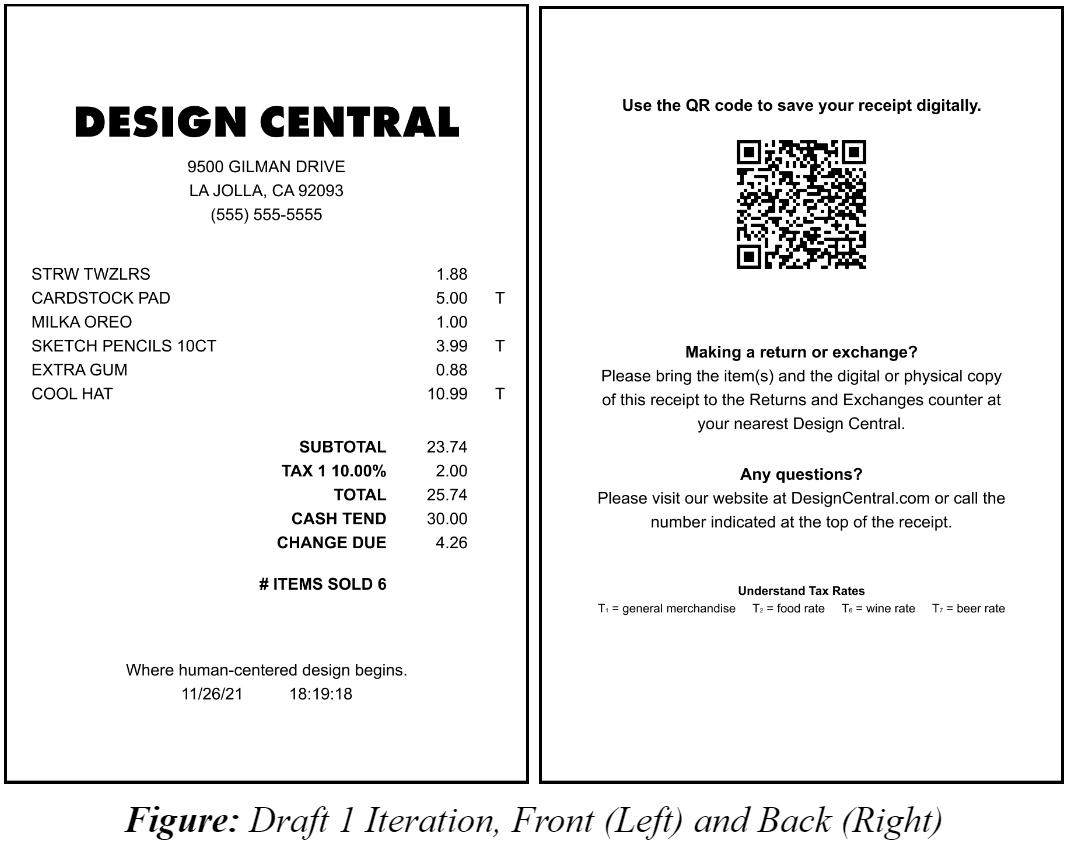
Component 1: Adding information to the back
After creating our initial redesign draft, we decided to explore the tax abbreviations associated with the listed items and what they meant. Many of our interviewees were unsure of what the tax abbreviation stood for or if they even were for indicating taxed items. In addition, there are inconsistencies with the abbreviation of the taxes. For instance, Costco receipts label taxed items with an “A” while Walmart receipts use a “T”. These differences across receipts make it difficult for users to remember what these labels mean on their receipts as each inconsistency messes with the knowledge in their head about these meanings.
We decided to label our redesigned receipts with a “T” and subtext indicating what type of tax the item is. This includes “T1” for general merchandise, “T2” for the food rate, “T6” for the wine rate, and “T7” for alcohol. We included a key of this information at the back of the receipt in addition to the QR code and return information. However, we thought it would be better to keep this information at the front of the receipt so that it would be easier for users to check the receipt on their first glance.
Final Redesign
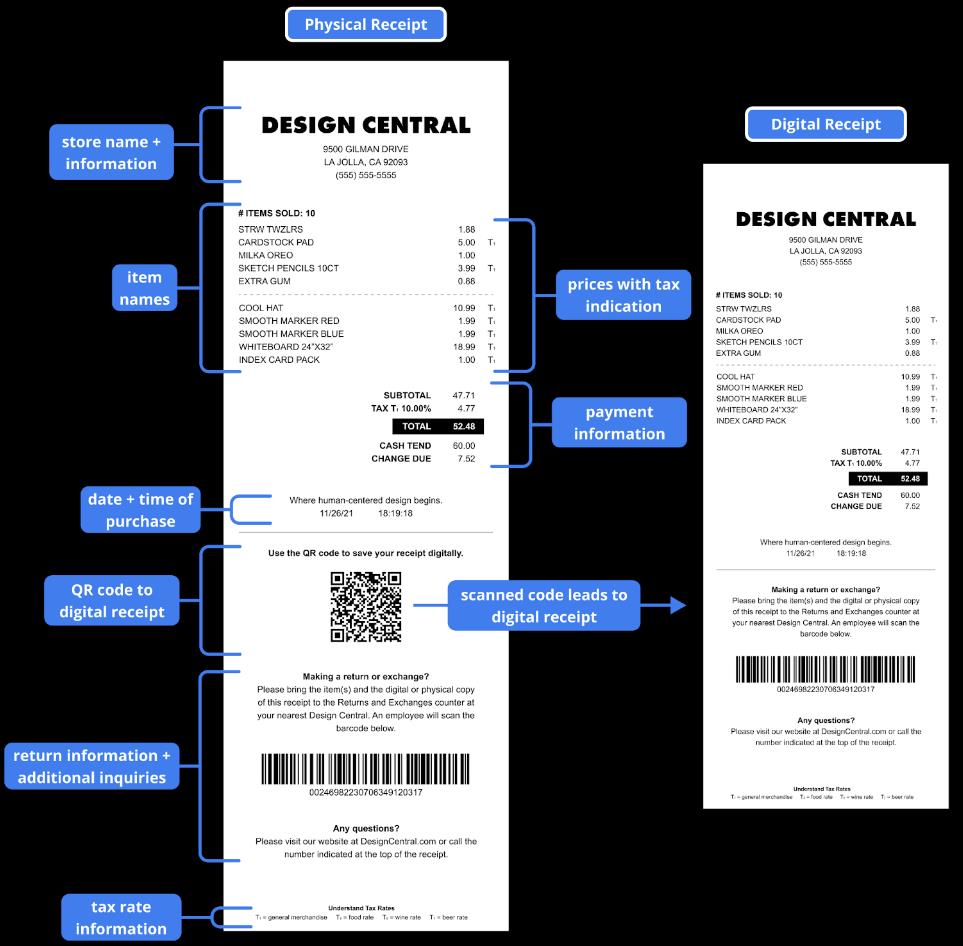
Component 1: Grouping information
Copious amounts of irrelevant information and disorganization caused the appearance of an overwhelming amount of details. Besides removing the unnecessary numbers and codes from the receipt, we categorized the purchases. We did this to the overall receipt by dividing it into two parts: the first half included the items and payment information while the second half included details for after purchasing. Arranging the information this way provides a logical constraint, as we typically read from up to down and left to right. Users reading over the receipt will tend to begin from the top where most of the relevant information should be before navigating downward to the miscellaneous information. The two halves of information are physically separated with a solid horizontal line.
For the first half, we wanted to keep the name of the store on the top so that it would be easy for users to identify which store they were looking at upon first glance. We have the items listed in groups of five in order to reduce the “block of text” feeling when users view their items. It also makes it easier for users to read which items they have purchased, as the dotted lines divide the items in regular intervals.
For the second half, we kept all of the information from the back of the receipt in our first iteration. This includes the QR code, return information, and tax rate information. We decided to position these components on the bottom of the receipt so that users can first look at the relevant information (i.e items purchased) then move on to the additional information if needed.
Component 2: Bolding certain information and headings
We bolded certain items on our redesign to denote relevant information. This includes the number of items sold, payment information, and the headings of each of the information paragraphs on the bottom. We especially wanted the total amount spent to stand out, since this is what most users typically look for on their receipts. We used a bold, white font against a dark rectangle for contrast. The bold text acts as a signifier to where the relevant information is on the receipt.
Component 3: Adding tax rate explanation
From our draft 1 iteration, we decided to keep the tax information on the receipt but on the front and bottom of the paper. We made the text small, as although the tax information is important, it may not be as relevant to the users as other information on the receipt. We wanted this information to stay on the page but not distract the user from other details on the page.
Conclusion
Receipts in their current form focus more on merchants, throwing all information at consumers without an effective structure. Its disposable nature causes people to overlook the small issues. Still, customers face problems when they need to make returns, exchanges, or find tax information. We also found coupons and surveys to be largely useless. We may decide in the future to relocate the coupons and surveys to the digital version of the receipt or add a small link to a website that does not take over the majority of the receipt. Solving these problems requires designing it to be more user-centered. Our redesign achieves this goal by having a clearer format that minimizes unnecessary and cluttered information.
Future redesigns can be done by standardizing the receipt format to reach a consensus for both consumers and merchants. We have also thought about creating two different receipts for customers and merchants: the uncluttered design without serial numbers for the customers and a more detailed design with serial numbers and retail-known abbreviations for merchants and the retail system. Beyond the standardization, we can make subtle distinctions in order to differentiate between stores—perhaps using different color text for stores at the top of their receipt. Similarly, the use of color can enhance the readability of the receipt by highlighting the important information, such as return policy. Regardless of what further redesigns we come up with, we will need to go back to the iteration stage and conduct more user testing and research in order to continue to create prototypes and refine our redesigns.